
The global AI customer service market reached $15.12 billion in 2026, up 25% from $12.06 billion in 2024, according to industry statistics compiled here. That number matters, but the more useful takeaway is what it signals. Support has moved from a back-office function to a product surface.
Users now judge a company by how fast it resolves confusion, not by how polished its help center looks. In Web3, that pressure is sharper. A delayed answer about a pending transaction, wallet connection, stablecoin deposit, or treasury allocation doesn't feel like a minor inconvenience. It feels like risk.
The teams getting AI customer service right aren't just automating replies. They're building a responsive operating layer that can answer questions, execute simple actions, and escalate cleanly when judgment is required. The teams getting it wrong usually buy a bot, wire it to a FAQ, and call the project done. That saves some tickets. It doesn't build trust.
The New Standard for User Experience
AI customer service has become the new baseline because users no longer separate support from product experience. If the product is instant but support is slow, the experience is still slow. If the interface feels modern but the help flow dead-ends in generic responses, the brand still feels brittle.
In practical terms, modern support needs to do four things well. It has to respond immediately, understand intent with reasonable accuracy, pull the right context from internal systems, and know when to involve a human. That's the standard. Not “we launched a chatbot.”
Support is now part of the core product
For product leaders, this changes budgeting and ownership. AI support shouldn't sit in a silo as a customer success experiment. It belongs in the same planning conversation as onboarding, payments, fraud controls, and account management because it shapes retention and conversion just as directly.
The strongest implementations feel less like a help widget and more like a guided command layer. In a SaaS product, that might mean handling billing changes or usage questions. In Web3, it might mean helping a user understand transaction status, protocol exposure, wallet permissions, or where funds are currently deployed.
Practical rule: If a support interaction requires the user to repeat information your systems already know, the experience is broken.
Why this matters more in Web3
Crypto products create a special kind of support load. The user isn't just asking “where is my order.” They may be asking why a transaction is pending, whether a vault allocation changed, what chain an asset sits on, or how to interpret a yield shift. Those questions mix education, operations, and trust.
That's why AI customer service has become strategic. It gives teams a way to handle repetitive, high-volume support while still preserving human time for exceptions, edge cases, and sensitive situations. Done well, it scales reassurance. Done poorly, it scales confusion.
Understanding the Core AI Technologies
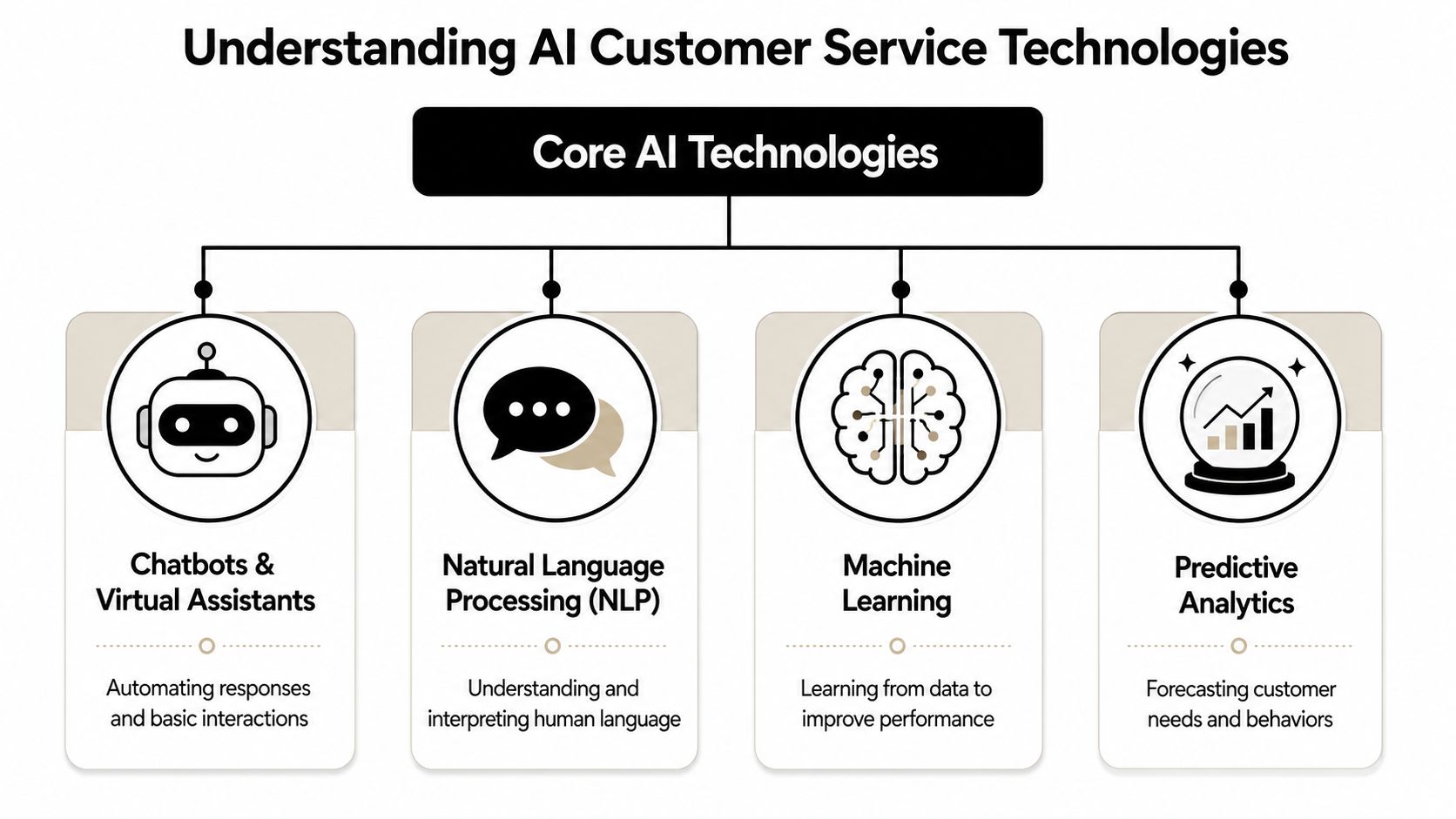
Many organizations talk about AI customer service as if it were one tool. It isn't. It's a stack. If you don't understand the layers, you'll buy a front-end demo and miss the systems work that makes it useful.
Conversational AI is the front door
Chatbots and virtual assistants are the interface users see first. Their job isn't just to “answer questions.” Their real job is to interpret intent, keep the conversation moving, and route the request toward either resolution or escalation.
A weak chatbot behaves like a search bar with manners. It matches keywords and spits out a document. A stronger conversational system asks clarifying questions, tracks memory across turns, and adapts its reply based on what the user already said.
That distinction matters in Web3 support. If someone asks why their stablecoin transfer hasn't appeared, the system should identify whether the issue is chain selection, wallet mismatch, network delay, or account-specific status. That requires more than canned scripts.
RAG is the open-book exam
Retrieval-augmented generation, usually shortened to RAG, is what gives the system grounded knowledge. The easiest analogy is an open-book exam. Instead of forcing the model to answer from memory, you let it consult the right pages from your own documentation, policy library, product database, and internal runbooks before it replies.
Without RAG, even a polished assistant will drift into generic answers. With RAG, it can anchor responses in your latest support content, fee rules, feature limitations, and process docs.
For teams building anything data-heavy, the same logic shows up in other AI systems too. This is similar to how applied models rely on structured inputs rather than raw intuition in machine learning trading algorithms.
Backend actions separate assistants from agents
The biggest leap in AI customer service happens when the system can do something, not just say something. That means authenticated connections to backend systems like a CRM, billing platform, order database, ticketing tool, wallet analytics service, or internal admin panel.
Here's the practical difference:
System type | What it does | Typical outcome |
|---|---|---|
Basic chatbot | Returns FAQ-style answers | Low containment |
AI assistant with RAG | Gives grounded, contextual responses | Better guidance |
Agentic support platform | Reads data and executes approved actions | Higher resolution |
If a user asks to update an order address, check account status, or retrieve transaction context, an agentic system can complete the task. A regular assistant can only describe the steps.
According to customer support KPI benchmarks, AI customer service agents reach a verified resolution rate of 70–85% when they operate as agentic platforms connected to backend systems that execute real actions. Standard AI assistants reach 40–60%, and basic FAQ chatbots top out lower.
Voice AI and sentiment analysis add realism
Voice AI brings the same logic to phone support and spoken interfaces. It matters when users need hands-free help, when issues are too nuanced for typing, or when a company still sees meaningful call volume.
Sentiment analysis is the emotional routing layer. It doesn't “feel” anything. It detects signals in language that suggest frustration, urgency, confusion, or risk. Used well, it changes the path of the conversation. It can slow the bot down, escalate faster, or adapt tone.
Good AI support isn't one smart model. It's a set of coordinated systems that know what to say, what to fetch, what to do, and when to stop.
Quantifying the Benefits and ROI
The business case for AI customer service is straightforward when you model it at the interaction level. Every support team already has a unit economics problem. Tickets cost money. Delays create churn. Repetitive work burns expensive human capacity on low-value tasks.
The strongest ROI cases come from three places at once. Lower cost per resolution. Higher automated containment. Better retention because users get answers immediately.

What the numbers show
According to Fin's ROI benchmarks for AI customer service agents, companies investing in AI-powered support generate an average return of $3.50 for every $1 spent, with leading organizations reaching up to 8x ROI. The economics are driven largely by cost per resolution. AI resolutions cost $0.99 to $2.00, compared with $6 to $12 for human-handled tickets.
That spread is large enough that even moderate automation can reshape support budgets. The same benchmark notes that for a team handling 50,000 monthly conversations, shifting 76% of volume to AI at $0.99 per outcome yields annual savings exceeding $2 million. It also ties instant, always-on resolution to a 15% reduction in customer turnover and says loyalty increases by 2.4x.
How to think about ROI like an operator
A lot of teams still justify AI support with broad language like “efficiency” or “better CX.” That's not enough for a budget meeting. The better frame is:
Start with volume. Count conversations by type, not just total tickets.
Segment repeatable work. Password resets, account questions, order status, transfer checks, billing explanations, and policy clarifications are usually the first candidates.
Model cost by resolution path. Compare AI-resolved interactions against human-handled ones.
Add retention impact carefully. Faster support often reduces churn, but your finance team should still treat that as a second-order gain unless you can validate it internally.
If you need a basic framework to structure that math clearly for internal stakeholders, this guide on learn ROI calculation from LicenseTrim is a useful refresher.
Where Web3 teams often underestimate value
Web3 support teams often look only at headcount savings. That's too narrow. The actual cost is interruption. When a user can't understand a transfer status, strategy change, or wallet connection issue, they pause activity. Sometimes they withdraw. Sometimes they never come back.
A support agent that can resolve simple operational friction quickly changes product usage, not just ticket cost. That's why the financial case for AI customer service usually improves over time. At first, it trims queue pressure. Later, it becomes part of activation, trust, and retention.
Operator's lens: The best AI support investment doesn't just reduce service cost. It prevents small moments of uncertainty from turning into lost revenue.
A Practical Implementation Roadmap
Most AI customer service projects fail for boring reasons. The goals are fuzzy, the knowledge base is messy, the integration plan is thin, and the launch happens before anyone defines what “good” looks like. The way around that is to treat implementation like a product rollout, not a plugin install.
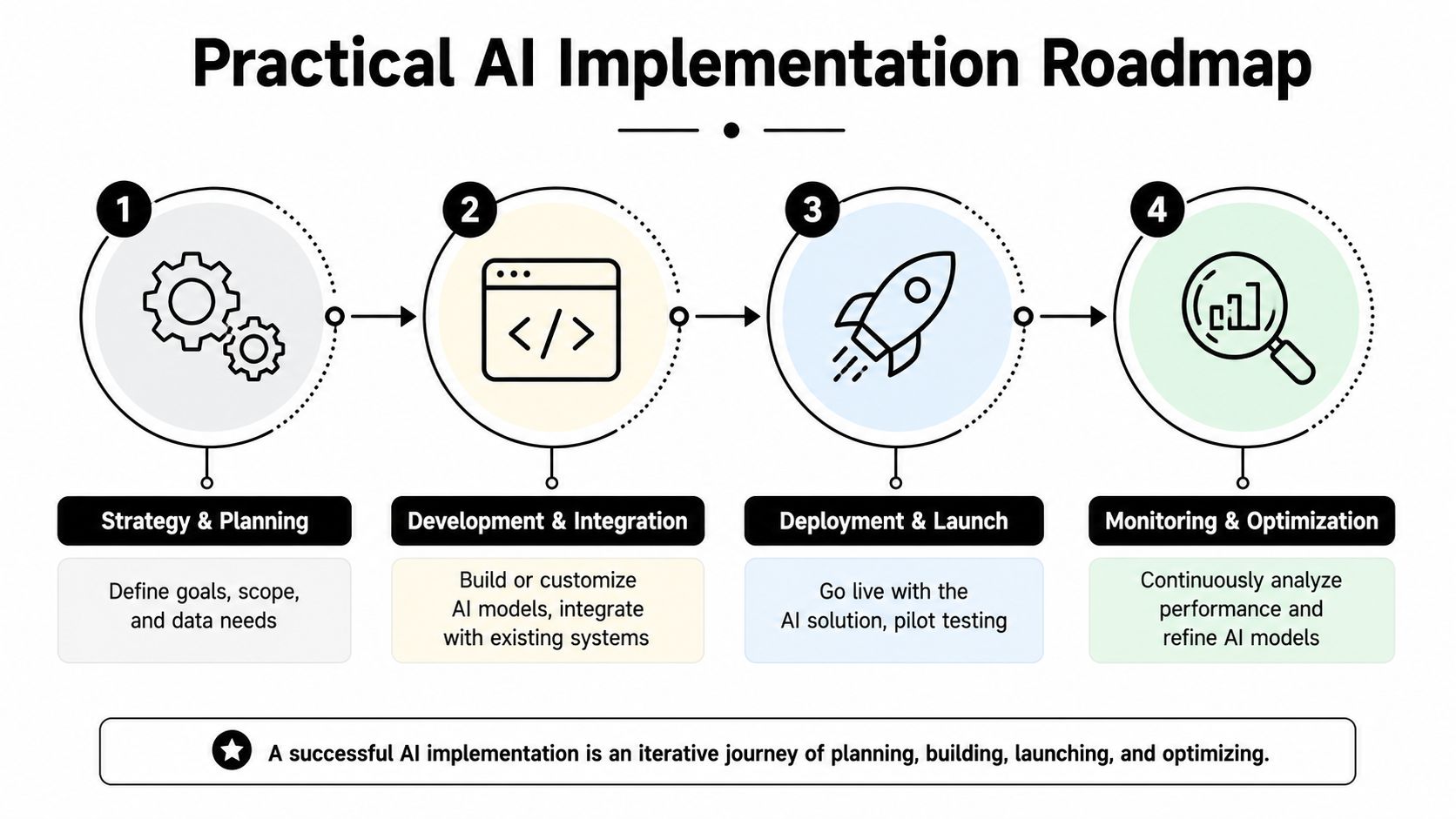
Discovery and goal setting
Start with support demand, not model selection. Pull a few weeks of tickets and conversations. Group them by intent. You're looking for repeatable jobs with a clear answer path and low policy ambiguity.
A practical shortlist often includes:
Status questions such as order tracking, transaction state, account verification, or payout timing
How-to guidance like wallet connection, deposit steps, billing changes, or product navigation
Simple account actions where the system can retrieve data or trigger an approved workflow
Routing and triage for requests that still need a specialist
Define success in business terms. Faster first response matters, but it isn't enough. You want higher resolution without creating more hidden rework for human agents.
Data and integration
Many teams learn that their support problem is a systems problem. If your documentation is outdated, contradictory, or scattered across Notion, Google Docs, old help center articles, and Slack threads, the assistant will inherit that chaos.
Clean the knowledge base first. Then connect the systems that matter. That may include your CRM, ticketing platform, order database, account service, payment tools, analytics stack, or internal admin workflows.
For Web3 products, integration work usually extends further. You may need chain-aware transaction context, wallet-linked account data, protocol status signals, and internal risk rules. The AI doesn't need everything. It needs the minimum reliable context to answer accurately and act safely.
A useful mental model is the same one used in AI-driven allocation tools. The value comes from combining decision logic with live data and guardrails, not from the model alone. That's also why product teams building adjacent systems often study use cases like how to use AI for investing.
Pilot and human training
Don't launch everywhere at once. Pick one or two high-volume workflows and run a controlled pilot. Keep human review tight in the early phase, especially on edge cases, billing questions, regulated topics, or anything involving money movement.
Train agents along with the model. Human teams need to know how the assistant reasons, what it can access, when it escalates, and how they should correct it. If agents don't trust the system, they'll work around it. If they overtrust it, they'll miss bad answers.
A strong pilot usually includes:
Workstream | What to validate |
|---|---|
Knowledge | Are answers grounded in approved content |
Actions | Can the system complete safe backend tasks correctly |
Escalation | Does it hand off early enough on risky cases |
QA process | Are humans reviewing enough conversations to spot drift |
Launch and optimization
Once the pilot is stable, expand by intent category, not by channel alone. It's tempting to say “we've added AI to chat, email, and voice.” That sounds broad, but it can hide weak coverage. Better to say “we reliably automate these specific jobs across supported channels.”
Monitor transcripts every week. Update content continuously. Add missing decision trees. Tighten escalation triggers. Product releases should trigger support content reviews by default. Otherwise the model answers last month's product.
Launching AI support without a maintenance loop is like shipping a pricing page and never updating it after the product changes.
The teams that get compounding value from AI customer service treat it as a living service layer. It improves because support, product, ops, and engineering keep feeding it better knowledge and cleaner controls.
AI in Action Real-World Use Cases
A large share of support demand still comes from a small set of repeatable questions. That is why the best AI customer service deployments start with operational jobs that have clear inputs, clear policies, and a measurable business payoff.
A common example is order tracking in e-commerce. The assistant checks the order record, confirms shipment status, explains what happened, and routes the case to a person if the package is delayed, lost, or tied to a refund dispute. That sounds basic, but it matters because customers care about speed only if the answer is grounded in real account data. Fast and wrong creates more tickets.

Financial services and high-trust environments
High-trust sectors have been early adopters for a reason. As industry adoption data shows, telecom, banking, and healthcare are already using AI heavily in support. The pattern is consistent. These teams handle large volumes of repetitive requests, but each answer still needs to respect permissions, policy rules, and audit requirements.
In financial services, the practical use cases are straightforward. Balance questions, transaction explanations, account access support, document retrieval, card controls, and eligibility checks all fit well if the model is connected to the right systems. The trade-off is equally straightforward. The more action the assistant can take, the tighter the controls need to be around identity, approvals, and escalation.
That handoff design matters more in finance than many teams expect. If an AI agent explains three failed transfer attempts and then passes the case to a human without the transcript, the customer has to repeat the issue while already frustrated. Good automation lowers effort. Good escalation preserves trust.
Web3 support works best when the AI has live context
Web3 is where the gap between a demo bot and a production support system becomes obvious.
A user asks why a deposit has not appeared. The answer could involve the wrong network, a wallet mismatch, confirmation delays, a bridge still in flight, a stale frontend state, or a product rule the user never saw. A generic chatbot can explain what a confirmation is. It cannot resolve the case unless it can inspect the actual wallet, transaction path, and product state.
That is why AI customer service in crypto, wallets, and DeFi works best when it is tied into authenticated context. The assistant needs access to account metadata, on-chain activity, internal ledgers, and product-specific rules. Without that, it behaves like a help center with a nicer interface.
A few practical patterns show up repeatedly:
Exchange or wallet support handles account status checks, transfer timelines, basic security guidance, and common compliance questions
DeFi protocol support explains vault deposits, reward timing, strategy changes, withdrawal queues, and transaction state
DAO and treasury operations answer internal questions about balances, policy limits, allocation logic, and recent treasury movement
I have seen the same architecture work for both external support and internal operations. Once the assistant can query the right systems and cite the source of truth, it stops being only a deflection tool. It becomes an interface for getting answers fast, with a human stepping in when judgment or exception handling is required.
A video example helps clarify how AI-led product experiences are moving in this direction:
The pattern behind the best deployments
The strongest deployments are narrow by design. They target a specific job, connect the model to approved data, define clear failure states, and make the handoff to human support smooth when the case turns risky or ambiguous.
That last part is the piece many teams miss. An AI assistant can answer correctly 80 percent of the time and still damage the experience if the remaining 20 percent lands on agents with no summary, no attempted actions, and no reason code. Real-world success is not just about automation rate. It is about whether the customer feels progress continued when the conversation changed hands.
Teams that stay disciplined here usually expand faster. They start with known workflows, prove reliability, then add harder cases where context transfer and human review matter just as much as model quality.
Navigating Common Pitfalls and Ethical Concerns
The most common mistake in AI customer service is assuming that a human handoff solves trust. It doesn't. A handoff without context is just a delayed restart.
That gap matters more than many organizations realize. According to this analysis of trust breakdowns in AI-driven service, most content focuses on offering a human handoff but ignores the data loss that happens when context isn't fully transferred. The same piece notes that 80% of consumers still crave a human agent. If the human joins cold, the failure compounds.
The liquid escalation gap
A proper escalation should feel like the baton pass in a relay race. The next runner shouldn't stop to ask who you are and where the race started. In support, that means the human agent receives conversation history, customer metadata, prior actions, detected sentiment, failed attempts, and the exact reason the AI escalated.
That's what “liquid escalation” means in practice. Not a button. A complete transfer state.
Here's what usually breaks:
Weak handoff | Strong handoff |
|---|---|
Agent only sees the latest message | Agent sees full transcript and summary |
No record of failed bot actions | Agent sees attempted steps and results |
Sentiment lost between systems | Agent sees frustration or urgency cues |
User repeats identity and issue | Context is preloaded before reply begins |
When teams miss this, users feel trapped in a loop. In Web3, that's especially damaging because the issue often involves money, custody assumptions, or transaction anxiety.
If the user has to restate their wallet issue, transfer history, or account state after escalation, the handoff failed.
Accessibility and bias don't fix themselves
Another blind spot is assuming that if the assistant works for the average user, it works well enough. It doesn't. Some users explain problems through screenshots. Some rely on screen readers. Some need simpler language or a less visually dense interface. Others may process instructions differently under stress.
Support leaders should pressure-test flows for accessibility from the start. Can the system handle image-based issue descriptions through a safe human route when needed? Can it produce concise instructions? Can the user choose a human without friction? Can tone adapt without becoming patronizing?
Bias shows up operationally, not just philosophically. If your training data overrepresents one kind of user and underrepresents another, the assistant may misunderstand phrasing, miss urgency, or respond poorly to accommodation needs.
Privacy and permissions need hard boundaries
In support systems tied to accounts, finance, or wallets, overexposure is a real risk. The AI should only access the minimum data required for the task. It shouldn't infer permissions it doesn't have. And it shouldn't create the impression of certainty when records are incomplete.
The safest pattern is narrow authority with clear fallback. Read what's needed. Act only on approved workflows. Escalate when identity, policy, or risk conditions are ambiguous.
That may sound conservative. It is. Reliable AI support usually looks more constrained than the marketing demos suggest.
Measuring Success and Choosing a Partner
A support bot that answers fast but forces the user to repeat everything to a human is not performing well. In AI customer service, the primary standard is resolution quality plus handoff quality. If the AI contains a case, that outcome should hold. If it escalates, the transfer should preserve intent, account context, prior steps, and risk signals so the human can pick up the thread without making the customer start over.
That is the gap many teams miss. They measure deflection first, then wonder why CSAT stalls and agent workload stays high.
The KPIs worth managing
Track a small set of metrics that map to customer trust and operating efficiency:
Verified resolution rate measures whether the issue was resolved in the AI path
Reopen rate shows whether “resolved” conversations come back because the first answer did not hold up
Answer accuracy checks whether responses match policy, product behavior, and approved knowledge
Escalation integrity measures whether the human received the right context, including user identity, prior troubleshooting, and the reason for transfer
Customer effort captures repeated steps, repeated explanations, and failed retries
Time to human readiness measures how long it takes an agent to act after takeover, not just how fast the handoff occurs
Escalation integrity deserves more attention than it usually gets. In wallet support, onramp issues, or transaction disputes, a poor transfer can turn a tense moment into a trust failure. The AI may correctly detect that a case needs a person, but if the agent receives only a transcript blob instead of a structured summary with the wallet address, failed action, device context, and risk flags, the user still pays the price.
How to review quality without fooling yourself
Dashboards help, but transcript review is where weak systems get exposed.
Review conversations every week. Sample routine cases and edge cases separately. Score whether the answer was correct, whether the AI chose the right path, and whether the escalation gave the human enough context to act immediately. Fluent language should not get a passing grade on its own.
This matters more in financial and Web3 products because a confident wrong answer can send a user to the wrong chain, the wrong bridge, or the wrong recovery step. I would rather see a clear transfer to a human than an elegant response built on partial context.
Selection filter: If a vendor spends more time on avatar demos than on QA workflows, permissions, and handoff design, treat that as a warning sign.
What to prioritize in a vendor
Feature grids are easy to pad. The harder questions reveal whether the system will hold up in production.
Can it read from the systems that hold the truth? Order data, wallet activity, KYC status, CRM history, and help center content need clear access rules.
Can it pass structured context to a human? A good handoff includes summary, intent, actions attempted, confidence level, and known risks.
How are permissions separated? Reading account status is different from changing settings or initiating account actions.
How does the team improve the system? Look for transcript sampling, error tagging, version control for prompts and policies, and rollback options.
Who owns the data and feedback loop? You want transcripts, labels, and performance history to remain usable if you switch vendors.
For teams evaluating AI beyond support, adjacent products can sharpen the buying criteria. An AI portfolio assistant for crypto users has to solve many of the same problems. Reliable data access, explainable outputs, clear permissions, and operator control all matter there too.
Choose the partner that helps your team run a dependable service layer. The polished demo matters less than whether the AI can resolve the right cases, escalate the risky ones cleanly, and give human agents enough context to protect customer trust.